# myRUC Classic vs myRUC Pro: Which Electronic RUC Option Is Right for You?
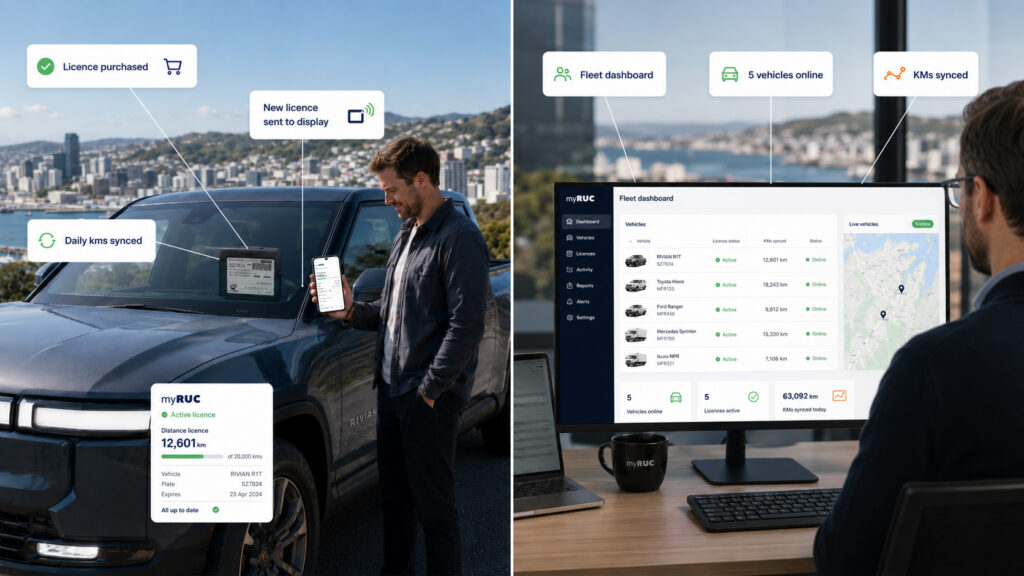
myRUC is designed for different types of drivers. A single EV owner does not need the same RUC workflow as a fleet manager responsible for dozens of vehicles.
That is why the product story is best understood in two paths: myRUC Classic and myRUC Pro.
Both use the same core idea: replace paper RUC labels with a digital workflow and an NZTA-approved e-ink display. The difference is how much administration, automation and fleet control you need.
Quick answer
Choose myRUC Classic if you are an owner-driver or small operator who wants a simple app and electronic display.
Choose myRUC Pro if you manage multiple vehicles and need a web portal, direct debit, reports, alerts, user roles or telematics-connected automatic RUC renewal.
What is myRUC Classic?
myRUC Classic is the simple electronic RUC option for owner-drivers and smaller operators.
It is designed for people who want to:
– Replace paper RUC labels
– Buy RUC from a mobile app
– Enter odometer readings manually
– Transfer the current licence to the display
– Receive reminders when RUC is getting low
– Avoid unnecessary vehicle tracking
Classic is well suited to EV owners, PHEV owners, light diesel vehicle owners, rideshare drivers and small businesses with only a few vehicles.
What is myRUC Pro?
myRUC Pro is built for fleet management and channel partner workflows. It adds more administration capability around the electronic RUC display.
Pro is designed for businesses that need:
– A web portal for multiple vehicles
– Fleet-wide RUC visibility
– User roles and administrator access
– Direct debit payment options
– GST invoices and purchase history
– Daily statement, invoice and direct debit reports
– RUC alerts across a fleet
– Telematics integration for automatic renewal
– Support for vehicle provisioning and device activation
For Spark/Blackhawk customers, myRUC Pro can receive odometer updates from the Blackhawk platform. Those updates can be used to trigger automatic RUC purchasing when a vehicle reaches its configured threshold.
Feature comparison
| Feature | myRUC Classic | myRUC Pro |
|—|—:|—:|
| NZTA-approved e-ink display | Yes | Yes |
| Mobile app | Yes | Yes |
| Web portal | Basic/customer access | Fleet/admin access |
| Manual RUC purchase | Yes | Yes |
| Multiple vehicles | Limited/simple use | Built for fleets |
| Direct debit | Not typical | Yes, where enabled |
| User roles and permissions | No | Yes |
| Fleet reports | No | Yes |
| Automatic RUC renewal | Requires integration | Yes, with telematics |
| Off-road claim automation | No | Requires telematics |
| Best for | Drivers/small fleets | Fleet managers/admins |
When Classic is the better fit
Classic is best when you want simplicity.
If you own an EV or PHEV and simply want to buy RUC, keep your licence current and avoid paper labels, Classic is the logical starting point. You do not need a complex fleet portal if you only manage one or two vehicles.
Classic also works well for small operators who want a cleaner RUC process without setting up a full fleet management workflow.
When Pro is the better fit
Pro is best when RUC has become an administration problem.
If your team is manually checking odometers, buying RUC for multiple vehicles, chasing drivers, reconciling invoices or worrying about vehicles running past their licence distance, myRUC Pro is the stronger option.
Pro becomes even more valuable when connected to telematics because odometer updates can support automatic RUC renewal.
Do both options use the same display?
Both product paths are based on the idea of a windscreen-mounted electronic RUC display. The display replaces the paper licence and gives drivers a physical compliance display in the vehicle.
The difference is not only the display. It is the surrounding workflow: app-led for Classic, portal-and-fleet-led for Pro.
Answer first: What is the difference between myRUC Classic and Pro?
myRUC Classic is for drivers and small operators who want app-based electronic RUC. myRUC Pro is for fleet managers who need portal administration, direct debit, reporting, alerts and telematics-supported automatic renewal.
Frequently Asked Questions
Do I need myRUC Pro for one vehicle?
Usually no. myRUC Classic is generally the better fit for a single owner-driver.
Do I need telematics for myRUC Pro?
Telematics is required for automatic RUC renewal and some advanced features, but the Pro portal can still support fleet administration workflows.
Can myRUC Pro help with invoicing?
Yes. Pro supports invoice and direct debit reporting, including reconciliation information for RUC purchases.
Can devices move between vehicles?
For Pro workflows, device moves need to be managed carefully. The device may need to be undeployed, reset and activated for the new vehicle.
No Comments yet!