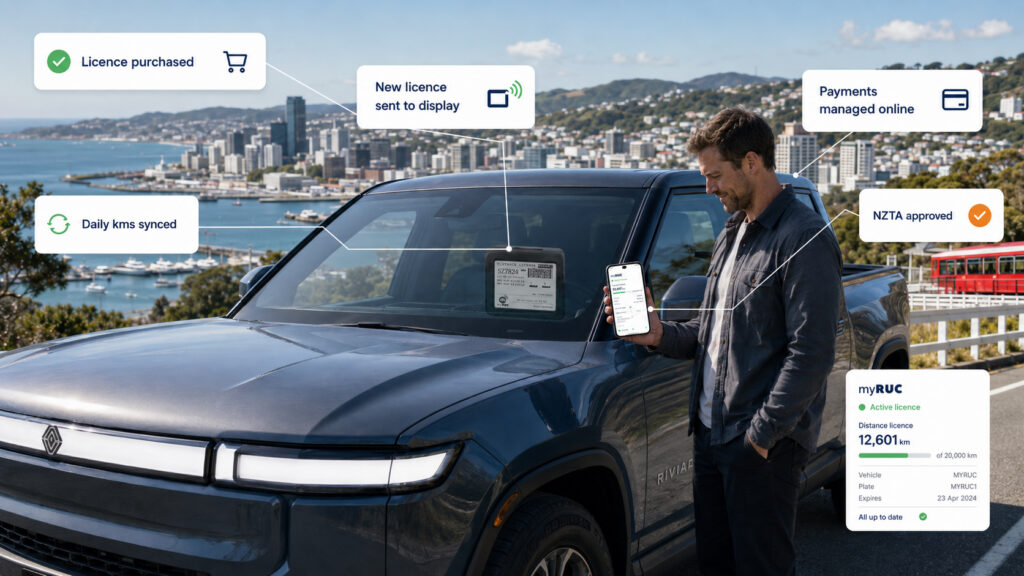
# How myRUC Works: App, Web Portal and E-Ink Display Explained
myRUC is an electronic Road User Charge system for New Zealand drivers and fleets. It helps you buy, manage and display your RUC licence without relying on a paper label.
The product is built around three parts: the myRUC app, the myRUC web portal and a 4.3-inch e-ink display mounted inside the vehicle windscreen.
Together, these parts make RUC easier to manage for EV, PHEV and light diesel vehicle owners.
The simple version
myRUC works like this:
1. Add your vehicle in the app or portal.
2. Enter or update your odometer reading.
3. Buy a RUC licence.
4. Transfer the licence to the e-ink display.
5. Keep driving with your current RUC licence visible in the vehicle.
For fleet customers, myRUC Pro can also support portal-based administration, direct debit, reporting, alerts and telematics-connected workflows.
Part 1: The myRUC e-ink display
The myRUC display is the physical device that replaces the paper RUC label. It sits inside the windscreen and faces outward so the current RUC licence can be viewed.
The display is designed for practical vehicle use:
– 4.3-inch e-ink screen
– Self-install windscreen mounting
– No wiring required
– Solar-powered, battery-backed design
– Clear display of the current RUC licence
– Built for compliance visibility
Because it uses e-ink, the licence remains readable without needing a bright powered screen like a phone or tablet.
Part 2: The myRUC mobile app
The mobile app is used by owner-drivers and smaller operators to manage RUC from a phone.
The app can help you:
– Register or access your vehicle
– View the current RUC licence details
– Enter the current odometer reading
– Buy a new RUC licence
– Transfer the licence to the display
– Receive reminders when the RUC licence is getting low
The goal is to make RUC management feel more like a simple digital top-up process.
Part 3: The myRUC web portal
The web portal supports account management, vehicle records and RUC administration. For individual drivers, it provides another way to access the service. For fleet customers, it becomes much more important.
With myRUC Pro, fleet managers can use the portal to:
– Manage multiple vehicles
– View RUC licence status
– Purchase or renew RUC
– Access invoices and proof of purchase
– Manage users and roles
– Configure renewal settings
– Review alerts and reports
For businesses, this is where myRUC starts to remove repetitive administration.
How licence transfer works
Once a RUC licence has been purchased, it needs to be displayed on the in-vehicle e-ink display.
The myRUC system supports licence transfer through the app or portal, depending on the product setup. For myRUC Pro, the display may update through the connected system. The Pro device is designed to preserve battery life, so updates may take up to 24 hours to appear on the display.
That 24-hour update window is important for fleet administrators to understand. Renewal thresholds should be set with enough buffer so vehicles remain compliant even if a display update happens on its normal daily cycle.
How automatic RUC renewal works for fleets
myRUC Pro can support automatic RUC purchasing when connected to a telematics provider such as Blackhawk.
In that setup, odometer readings are sent to the myRUC platform. The system compares the vehicle’s remaining RUC distance against configured thresholds. When the vehicle gets close to the threshold, myRUC can purchase the next RUC licence automatically.
This is especially useful for fleets because it reduces manual checking and helps prevent vehicles from running past their RUC licence distance.
Do you need GPS?
Standard myRUC does not use GPS to track your vehicle.
Telematics or GPS data is only needed for specific advanced features, such as automated renewal based on odometer data or automated off-road claims. If you are a normal owner-driver using myRUC, you can manage your odometer manually through the app.
Answer first: How does myRUC work?
myRUC works by connecting your vehicle, RUC purchase and electronic display. You buy or manage RUC through the app or portal, then transfer the current licence to a windscreen-mounted e-ink display so your vehicle remains compliant.
Frequently Asked Questions
What does the myRUC display show?
It shows the current RUC licence details on an e-ink display mounted inside the windscreen.
How often should I update my odometer?
Standalone users should update the odometer periodically so RUC purchases start from the right distance. Fleet users may receive odometer updates through telematics.
Can the display update instantly?
For some workflows, licence transfer happens through the app or portal. For myRUC Pro, the display may update once every 24 hours to preserve battery life.
What happens when my RUC is nearly expired?
myRUC can send alerts through the app, email or portal. myRUC Pro can also support automatic renewal when connected to telematics.
No Comments yet!